
Choosing between an SSD and an HDD can make a noticeable difference in your computer’s speed, storage capacity, and overall performance. Both devices store your files, applications, and operating system, but they use different technologies.
An SSD is generally the better choice for speed, while an HDD remains useful for storing large amounts of data at a lower cost. Understanding the differences can help you choose the right option for your needs.
What Is an SSD?
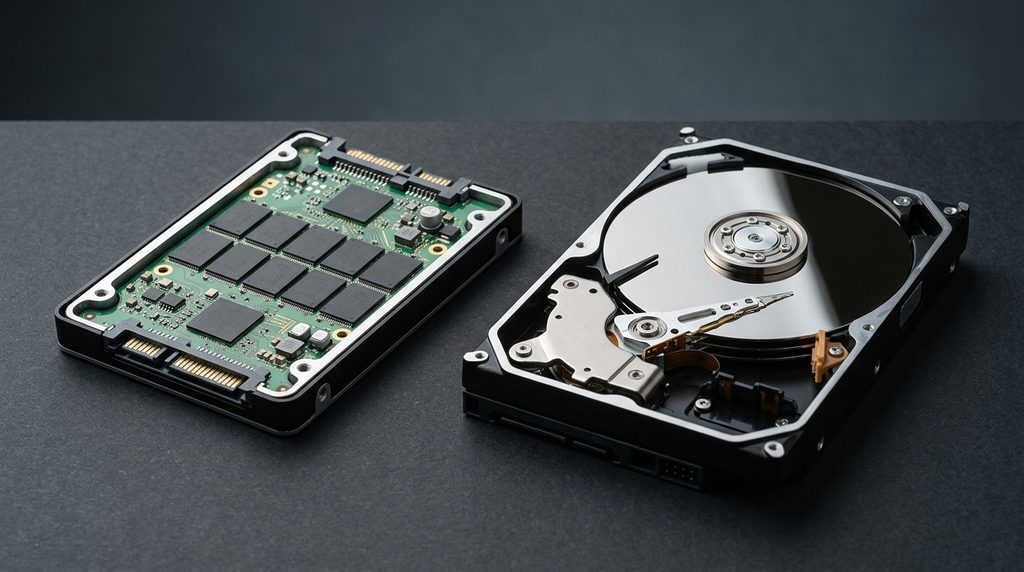
A solid-state drive (SSD) stores data on flash memory chips and has no moving mechanical parts. This allows it to access information much faster than a traditional hard drive.
With an SSD, your computer can start up in seconds, applications open more quickly, and everyday tasks feel more responsive. SSDs are also quieter, consume less power, and are generally more resistant to physical shock.
Their main disadvantage is price: SSDs typically cost more per gigabyte than HDDs, particularly at higher capacities.
What Is an HDD?
A hard disk drive (HDD) stores data on spinning magnetic disks. A mechanical arm reads and writes information as the disks rotate.
HDDs have been used in computers for decades and remain a practical option for storing large files, photos, videos, backups, and archives.
You can also explore Seagate’s storage solutions to learn more about hard drives and high-capacity storage options.
Their biggest advantage is affordability. You can usually get more storage space for the same amount of money compared with an SSD. However, HDDs are slower, produce some noise, and contain moving parts that can be damaged by physical impacts.
SSD vs HDD: The Main Differences
| Feature | SSD | HDD |
|---|---|---|
| Speed | Much faster | Slower |
| Price per GB | Usually higher | Usually lower |
| Durability | More resistant to physical shock | More vulnerable to impacts |
| Noise | Silent | Can produce noise |
| Power consumption | Generally lower | Generally higher |
| Best use | Operating systems, apps, gaming | Large files and archives |
Actual performance and prices vary depending on the specific drive, capacity, and connection type.
Which Is Better for Gaming and Everyday Use?
For everyday computing, an SSD is usually the better option. It helps Windows or another operating system boot faster, reduces application loading times, and makes a computer feel more responsive.
Gamers can also benefit from an SSD because many games load levels and assets more quickly. However, an SSD does not automatically increase frame rates significantly; those depend more on components such as the graphics card and processor.
For video editors, photographers, and people who manage large collections of files, an HDD can provide affordable additional storage. A combination of both drives can offer an excellent balance of speed and capacity.
Can You Use Both an SSD and an HDD?
Yes. Many desktop computers support both types of storage, and some laptops do as well.
A practical setup is to install the operating system and frequently used applications on an SSD, then store large media files, older projects, and other data on an HDD.
If your computer currently uses an HDD and feels slow, upgrading to an SSD can be one of the most noticeable improvements you can make without replacing the entire machine. Before buying, check which drive sizes and interfaces your computer supports.
SSD vs HDD: Which Should You Buy?
For most people buying a primary drive today, an SSD is the best choice. It offers faster performance, silent operation, and a smoother everyday experience.
An HDD still makes sense when you need affordable, high-capacity storage for files you do not access frequently.
The bottom line: Choose an SSD for speed and everyday performance, an HDD for budget-friendly bulk storage, or both if your computer supports them. Whatever you choose, keep a separate backup of important files because neither type of drive is immune to failure.
Stay Ahead With Future Tech Hub
Technology moves fast. We keep you ahead with the latest AI, technology, cybersecurity, software, and gadget news.