
How to tell if your phone has been hacked is becoming an increasingly important question as smartphones hold more personal information than ever. Your phone may contain private messages, photos, banking apps, passwords, emails, location data, and access to your social media accounts. If someone gains unauthorized access, the consequences can extend far beyond the device itself.
The good news is that there are warning signs you can look for. A phone becoming unusually slow, draining its battery quickly, showing unfamiliar apps, or behaving strangely does not automatically mean it has been hacked. However, several unusual changes appearing together deserve closer attention.
Here are 10 warning signs that could indicate your phone has been compromised and what you should do if you notice them.
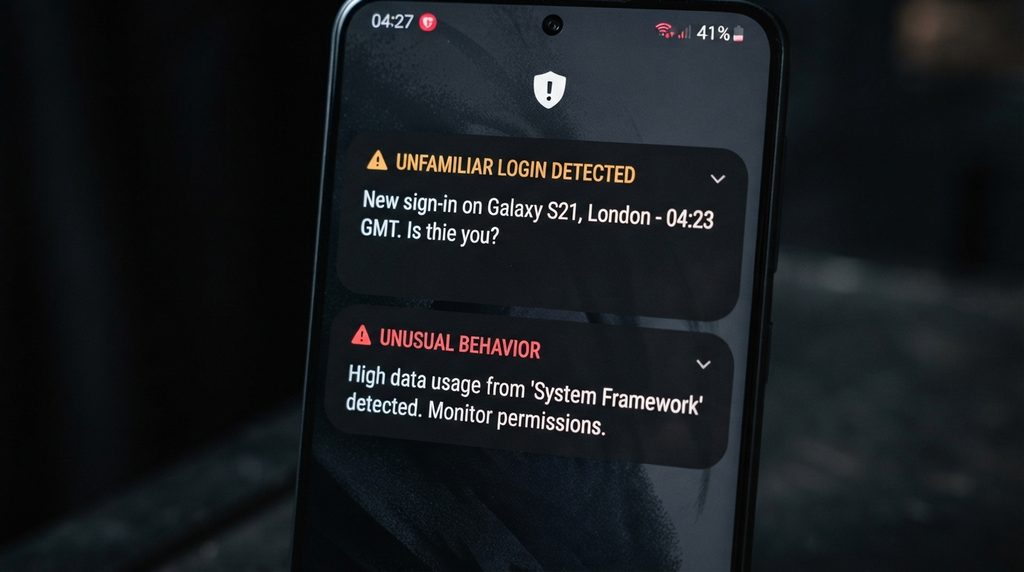
1. Your Phone Suddenly Becomes Very Slow
One of the first things people notice when something is wrong with their phone is a sudden drop in performance.
Applications may take longer to open, the device may freeze more frequently, or the phone may become unusually hot even when you are not doing anything demanding.
However, slow performance by itself is not proof of a hacked phone. Older hardware, limited storage, outdated software, poorly optimized applications, and battery problems can all cause similar symptoms.
The warning becomes more significant when unexplained performance problems appear alongside other suspicious activity, such as unfamiliar applications or unexpected network usage.
2. The Battery Is Draining Much Faster Than Normal
A sudden change in battery life can sometimes indicate that an application or malicious process is running continuously in the background.
If your phone used to last most of the day but suddenly requires charging much more frequently without a change in how you use it, investigate which applications are consuming the most power.
Both Android and iPhone devices provide battery-usage information that can help identify unusually active applications.
Keep in mind that battery degradation is extremely common. An aging battery, a recent operating system update, high screen brightness, location services, and intensive applications can all increase power consumption.
Battery drain becomes more concerning when it appears together with other unexplained changes.
3. Your Phone Gets Hot When You Are Not Using It
Smartphones can become warm during gaming, video recording, navigation, charging, or other intensive activities.
But unexplained heat while the phone is sitting idle can be worth investigating.
A background application continuously using the processor, camera, microphone, location services, or internet connection could potentially cause additional activity.
Check which applications are running and review battery and system activity. If the problem persists after restarting the phone and closing unnecessary applications, investigate further.
Heat alone does not mean someone has hacked your phone, but unexplained background activity should not be ignored.
4. You Find Apps You Do Not Remember Installing
An unfamiliar application is one of the more important things to investigate.
Check your installed applications regularly and look for software you do not recognize. Pay particular attention to applications that appeared without you intentionally installing them or that have unusual names, icons, or permissions.
However, do not immediately assume every unfamiliar app is malicious. Some applications are installed by the phone manufacturer, mobile carrier, workplace, or another legitimate service.
If you find an application you cannot identify, search for its official name and developer before removing it. Avoid opening suspicious applications or granting them additional permissions while investigating.
On Android, Google Play Protect can also help identify potentially harmful applications. iPhones have additional security protections built into iOS, although users should still review installed apps and device settings.
5. Your Phone Is Using More Mobile Data Than Usual
Unexpected data usage can be another clue.
If an application is constantly communicating with external servers, it could consume more mobile data than you normally expect. This does not necessarily mean malicious software is involved, because automatic photo backups, video applications, cloud synchronization, operating system updates, and social media can also use substantial amounts of data.
Check your phone’s cellular or mobile-data settings to see which applications are responsible.
If one unfamiliar application is consuming a large amount of data without an obvious reason, investigate it.
A sudden increase in data usage is particularly worth examining when it appears together with battery drain, overheating, or an unfamiliar application.

6. Your Accounts Show Activity You Do Not Recognize
Sometimes the clearest evidence of a security problem does not come from the phone itself.
You may receive a notification about a login from an unfamiliar device, find messages you did not send, discover password changes you did not request, or notice purchases and other account activity that you do not recognize.
This could mean that someone has obtained access to one of your accounts.
Importantly, an account being compromised does not necessarily mean the phone itself has been hacked. A stolen password, phishing attack, leaked credentials, or reused password could give an attacker access without compromising the device.
If you see suspicious account activity, change the affected password immediately from a trusted device and enable two-factor authentication where available.
7. You Receive Unexpected Security Codes
Receiving a login verification code that you did not request is another warning sign.
For example, you might receive an SMS, email, or authentication notification saying someone is attempting to sign in to one of your accounts.
Do not share that code with anyone.
Attackers sometimes try to convince victims that a verification code is needed to “secure” an account or complete a support request. In reality, giving the code to someone else could allow them to bypass an important security measure.
If unexpected authentication requests continue, change your password and review the account’s active sessions and connected devices.
Where supported, passkeys can provide stronger protection against many types of credential theft because they are designed to resist phishing.
8. Your Settings Have Changed Without You Doing It
Unexpected changes to important phone settings deserve attention.
You might notice that permissions have changed, an unfamiliar device administrator has been enabled, accessibility features have been activated, or security settings no longer match the configuration you remember.
Some settings can also change after operating system updates or when applications request new permissions, so investigate before assuming the worst.
Pay particular attention to permissions involving the microphone, camera, location, contacts, messages, accessibility features, and device administration.
If an unfamiliar application has powerful permissions that it does not reasonably need, remove its access and investigate the application.
9. Pop-Ups and Redirects Appear When You Are Not Browsing
Unexpected advertisements, pop-ups, browser redirects, or fake security warnings can indicate that something is wrong.
For example, a browser might repeatedly redirect you to unfamiliar websites, or you might see warnings claiming that your phone is infected and asking you to install an application.
These messages are often scams rather than evidence that the phone has actually been hacked.
Do not click suspicious warnings or install software simply because a pop-up tells you that your device is infected.
Instead, close the page, remove suspicious browser notifications if necessary, and check recently installed applications.
If the behavior continues across different applications and websites, investigate the device more carefully.
10. Your Phone Behaves as If Someone Else Is Controlling It
The most alarming situation is when your phone appears to perform actions you did not initiate.
This could include applications opening unexpectedly, messages being sent without your involvement, calls appearing in your history that you did not make, or other unexplained activity.
Again, there can be harmless explanations. Touchscreen problems, accidental inputs, software bugs, or a damaged screen can cause unexpected behavior.
But unexplained actions combined with other warning signs should be treated seriously.
Disconnecting the device from the internet temporarily can help limit potential remote activity while you investigate.
What to Do If You Think Your Phone Has Been Hacked
If you believe your phone may have been compromised, do not panic. Start by separating the problem into two questions: Is the device compromised, or are one or more of my accounts compromised?
First, disconnect from Wi-Fi and mobile data if you suspect active unauthorized activity. This can temporarily prevent suspicious applications from communicating with external services.
Next, check your installed applications and remove software you do not recognize or no longer need. Review application permissions and revoke access that does not make sense.
Install the latest operating system and security updates available for your device. Updates can fix vulnerabilities that attackers may exploit.
Then secure your important accounts. Change passwords for email, banking, social media, and other sensitive services. Use unique passwords rather than reusing the same password across multiple accounts.
Enable multi-factor authentication wherever possible.
You should also review active sessions and logged-in devices for important accounts. If an unfamiliar device appears, sign it out and investigate how access was obtained.
For especially sensitive accounts, consider changing passwords from a different trusted device if you believe the original phone may be compromised.
When Should You Factory Reset Your Phone?
A factory reset can be an effective last resort if you cannot identify or remove persistent malicious software.
Before resetting the device, make sure important photos, contacts, documents, and other data are backed up safely. Be careful not to restore suspicious applications or configurations after the reset.
After resetting the phone, install the latest available operating system updates and reinstall applications only from official sources.
If the phone continues behaving strangely after a clean reset, the problem may not be malware at all. Hardware problems, defective components, network issues, or account compromises can create similar symptoms.
For serious cases involving financial accounts, sensitive business information, or suspected targeted attacks, professional cybersecurity or technical assistance may be appropriate.
How to Prevent Your Phone From Being Hacked
Knowing how to tell if your phone has been hacked is useful, but prevention is even better.
Keep your phone’s operating system and applications updated. Security updates can address vulnerabilities before attackers have an opportunity to exploit them.
Only install applications from trusted official stores and carefully review the permissions they request.
Use a strong device passcode and avoid simple combinations that someone could easily guess.
Protect your important online accounts with unique passwords and multi-factor authentication. For supported services, passkeys can provide another strong layer of protection.
Be careful with unexpected links and messages. Phishing attacks can trick users into giving away passwords, authentication codes, or other sensitive information without requiring an attacker to directly compromise the phone.
You can also learn more about how to secure your online accounts to strengthen the accounts connected to your smartphone.
Not Every Strange Phone Problem Means You Have Been Hacked
It is important not to confuse ordinary smartphone problems with evidence of a cyberattack.
Battery degradation, insufficient storage, buggy applications, poor network connections, software updates, overheating, and damaged hardware can all make a phone behave unusually.
The key is to look for patterns rather than one isolated symptom.
A phone that becomes slightly slower over several years is normal. A phone that suddenly becomes hot, drains its battery, consumes unusual amounts of data, shows an unfamiliar application, and generates unexplained account activity deserves much more attention.
The more independent warning signs you see at the same time, the more seriously you should investigate the situation.
The Bottom Line
Knowing how to tell if your phone has been hacked starts with recognizing that no single symptom proves a device has been compromised. Battery drain, overheating, slow performance, pop-ups, and unusual data usage can have many ordinary explanations.
More serious warning signs include unfamiliar applications, unexplained account activity, unexpected security codes, unauthorized settings changes, and actions that appear to happen without your involvement.
The best defense is a combination of updated software, strong authentication, careful app permissions, unique passwords, and skepticism toward unexpected messages and links.
Your smartphone is effectively a gateway to much of your digital life. Protecting it therefore means protecting not only the device itself, but also the accounts, financial information, personal data, and identity connected to it.
For Android users, Google’s official security guidance provides additional information about protecting devices, reviewing security settings, identifying potentially harmful applications, and keeping Android phones secure. The Google Android security guide offers practical recommendations for maintaining the security of your device and personal information.
For iPhone users, Apple’s Personal Safety User Guide provides detailed information about device and account security, privacy controls, unwanted access, and steps users can take when they believe someone may have gained access to their information.
Stay Ahead With Future Tech Hub
Technology moves fast. We keep you ahead with the latest AI, technology, cybersecurity, software, and gadget news.