
ChatGPT memory can work in two main ways: saved memories and information from past conversations, depending on the features available to your account.
1. Saved Memories
Saved memories are pieces of information that ChatGPT keeps for future conversations.
You can explicitly tell ChatGPT to remember something by saying:
“Remember that I prefer bullet-point answers.”
ChatGPT can then save that preference and use it in future chats.
You can also ask:
“What do you remember about me?”
or:
“Forget that I prefer bullet-point answers.”
This gives you control over the information stored as memory.

2. Reference to Past Conversations
Depending on your ChatGPT settings and plan, ChatGPT may also be able to use relevant information from previous conversations.
This is different from remembering every conversation word-for-word.
Instead, relevant information from previous chats may be used when it helps answer a new question.
For example, if you’ve previously discussed a website project with ChatGPT, a future conversation about that project may benefit from information you’ve already shared.
Does ChatGPT Remember Everything You Say?
No.
ChatGPT memory should not be thought of as a complete recording of every conversation.
Memory is intended to retain useful information that can make future conversations more personalized.
There can also be information that ChatGPT doesn’t retain or use as memory.
This distinction is important because:
Chat history ≠ saved memory.
Your conversations and saved memories are different concepts, and the exact features available can depend on your ChatGPT settings.
What Can ChatGPT Remember?
Useful examples of information that may be remembered include:
Preferences
For example:
“I prefer explanations without complicated technical language.”
Writing preferences
For example:
“Use headings and short paragraphs when writing articles for me.”
Long-term projects
For example:
“I’m building a technology website.”
Interests
For example:
“I’m interested in AI and cybersecurity.”
Recurring goals
For example:
“I’m trying to learn more about SEO.”
Remembering these types of details can make future conversations faster because you don’t necessarily have to repeat the same information.
Can You Tell ChatGPT What to Remember?
Yes.
You can explicitly ask ChatGPT to remember something.
For example:
“Remember that I prefer answers in simple English.”
You can also ask ChatGPT to forget something:
“Forget that I prefer answers in simple English.”
This can be useful when your preferences or circumstances change.
How Do You See What ChatGPT Remembers?
You can ask ChatGPT directly:
“What do you remember about me?”
Depending on your version of ChatGPT, you can also manage memory through the settings.
Look for the Memory section in ChatGPT’s settings.
There you may be able to review or manage saved memories.
Can You Delete ChatGPT Memories?
Yes.
You can ask ChatGPT to forget a particular memory.
For example:
“Forget that I work in technology.”
You can also manage saved memories through the ChatGPT settings when the feature is available.
However, deleting a memory and deleting a conversation are not necessarily the same thing.
If you want something completely removed, it’s important to understand which type of information you’re deleting.
What Happens If You Turn Memory Off?
Turning memory off prevents ChatGPT from using memory in the way that feature is designed to work.
The exact behavior depends on your ChatGPT settings and the features available to your account.
Memory controls are separate from some other conversation and data controls, so turning off one feature doesn’t necessarily mean every conversation-related feature is disabled.
Is ChatGPT Memory the Same as ChatGPT’s Training Data?
No.
These are two different concepts.
ChatGPT memory is about information that can be used to personalize your conversations.
Model training is about how AI models are developed and improved using data under the applicable policies and settings.
Your saved memory should not be thought of as ChatGPT “retraining itself” every time you tell it something.
Is ChatGPT Memory Safe?
Memory can make ChatGPT more useful, but it’s still important to be careful about the information you share with any online service.
Avoid sharing highly sensitive information unless you understand the relevant privacy implications and actually need to provide it.
If you’re concerned about a particular piece of information, you can check your memory settings and ask ChatGPT what it remembers.
ChatGPT Memory vs. Chat History
These two terms are easy to confuse.
| Feature | What it means |
|---|---|
| Chat history | Your previous conversations |
| Saved memory | Specific information that can be retained for future personalization |
| Reference to past conversations | Using relevant information from previous chats when available |
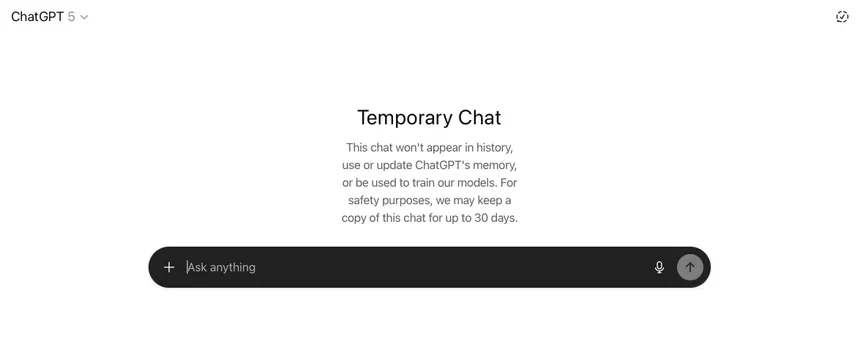
| Temporary Chat | A conversation designed not to use or create memories in the usual way |
The exact availability and behavior of these features can change as ChatGPT evolves.
Why Is ChatGPT Memory Useful?
The biggest advantage is personalization. Memory is one part of making AI assistants more useful, alongside capabilities such as planning, decision-making, and taking actions. To understand how these systems differ from traditional chatbots, see our guide on what an AI agent is and how AI agents work
Imagine you regularly use ChatGPT to work on a project.
Without memory, you might repeatedly need to explain:
- What your project is
- What you’re trying to achieve
- How you want information formatted
- What tools you’re using
- What you’ve already completed
With memory and relevant past context, ChatGPT can potentially start future conversations with more useful context.
That can save time and make the interaction feel more continuous.
Frequently Asked Questions
Does ChatGPT remember previous conversations?
Depending on your settings and the features available to your account, ChatGPT may use saved memories and relevant information from previous conversations to provide more personalized responses.
Can I ask ChatGPT to forget something?
Yes. You can ask ChatGPT to forget a specific piece of information that has been saved as a memory. You may also be able to manage or remove saved memories through your ChatGPT settings.
Does ChatGPT remember every message?
No. ChatGPT memory is not a complete record of every message you have ever sent. Instead, it can retain or reference information that may be useful for future conversations, depending on your settings and available features.
Can I turn off ChatGPT memory?
Yes. Memory can be managed through ChatGPT’s settings. The available controls may vary depending on your account, plan, and the features currently available.
Is ChatGPT memory permanent?
No. Saved memories can be reviewed, modified, or deleted. You can also manage your memory settings if you no longer want ChatGPT to use saved information for personalization.
Final Thoughts
ChatGPT memory is designed to make conversations more personalized by allowing certain useful information to carry over between interactions.
Rather than treating ChatGPT as an AI that remembers everything, it’s better to think of memory as a layer of useful context that can help ChatGPT understand your preferences, interests, and ongoing projects.
The most important thing is that you have control over memory. You can ask what ChatGPT remembers, tell it to remember something, ask it to forget something, and manage memory through your settings.
As AI assistants become more personalized, memory will likely become an increasingly important part of how people interact with AI.
Stay Ahead With Future Tech Hub
Technology moves fast. We keep you ahead with the latest AI, technology, cybersecurity, software, and gadget news.